
At some point or another, it’s inevitable that every business will need to change their business phone system. If you are currently in this position then don’t worry, you’re certainly not alone.
In most cases, the need to replace a business phone system is caused by a certain event. Here are the five main reasons that force businesses into a change of phone system:
Your phone system has fallen behind the times
Although your system may have delivered a steady and reliable service over the years, there comes a time when the advancements in technology mean that your phone system is too far behind the industry standard and your business productivity is a long-shot from its potential if it was leveraging modern technology.
Support has come to an end
When technology products have been on the market for a long time, vendors will often set a date for end-of-support, which essentially means that they are no longer responsible if anything goes wrong with the system after that day. You will also be unable to order replacement parts for it. Since your business is heavily reliant on your “always-on” phone system to provide service to your customers, using an unsupported system is a risk you cannot afford to take.
Your business has grown too much for your system to handle
This is one of the rare positive events that require you to upgrade a business phone system. As your business progresses, you will naturally bring more and more people on-board. You may even be opening a new branch office. Phone systems always a certain range of users that they are designed to be able to handle. If you begin to exceed this, it’s vital to upgrade to a larger system to prevent issues arising.
The system is draining too much time or expense.
Obviously, there are times when a visit from your system provider is required, but with many modern phone systems, these visits should only be an occasional occurrence. Gone are the days when you were required to pay for expensive service calls to perform simple administrative tasks, such as adding a new handset or relocating an employee. Businesses will often change their outdated business phone system purely because they want the flexibility and affordability of a modern system.
If any of these circumstances apply to you then its time to make the first step of deploying a new business phone system in order to avoid problems that could interrupt the flow of day-to-day business.

Key considerations for your new business phone system
Are desk phones necessary for my new system?
This is one of the biggest questions when it comes to changing a phone system. As technology in this industry has progressed, there has been a significant rise in the number of vendors offering soft-phone solutions which consist of plugging headphones into a PC and receiving/making calls from an online application.
This approach brings several benefits such as flexibility when it comes to adding and removing users, and not having to purchase physical phones. In some cases, this option works well as setup costs are lower and it means employees can be more mobile if their job entails them to be frequently away from their desk. However, the majority of businesses still choose to deploy desk phone systems. Why is this?
Some users still prefer desk phones where call reliability, muscle memory or role-specific use matters. Others work better with soft clients and mobile devices. The decision should come from the role, environment, call quality requirement and support model.
Familiarity is also important. A phone-system change should not force users into avoidable retraining if the existing device behaviour is still the right fit for their work.
What are the essential features in modern phone system?
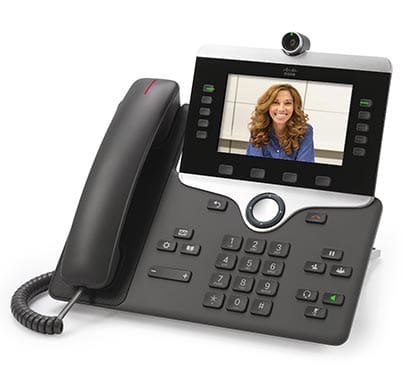
Nowadays, pretty much every phone system will offer basic capabilities such as call hold and transfer, do not disturb, and call forwarding. But when you want to upgrade your phone system, it makes sense to look at where you are going to get the most feature-rich system for your budget.
There are some more advanced features that your new system should definitely be capable of, such as 3-way calling, single-number reach, voicemail-to-email, speed dialling, and presence which enables your employees to easily see which of their colleagues are currently on the phone. If the nature of your business involves you frequently receiving calls from customers, you should definitely be considering systems that offer an automated attendant as well as hunt groups. These efficiently guide callers to the correct employees.
Can I get a phone system that is easy to maintain?
In general, most small and medium-sized businesses are very limited when it comes to in-house technical resources. That’s why so many of them rely heavily on outside technology specialists to handle the ongoing administration of their phone system which can prove to be quite expensive in the long-run. Although circumstances will inevitably arise where outside assistance is required, it is in the interest of any business to keep these engagements to a minimum to save money and time.
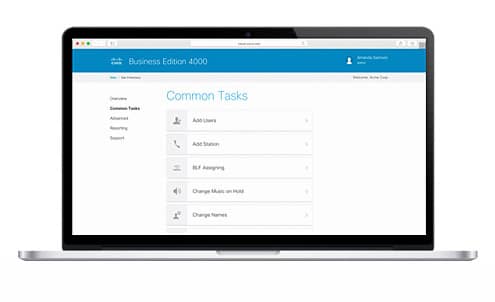
We have good news for you, the better-designed modern business phone systems are so simple to maintain that any employee with a nontechnical background should be able to handle everyday tasks such as adding phones, moving an extension, or changing hold music with ease. You should prioritise this type of system when upgrading.
An even more advanced and useful version of this is phone systems that provide a cloud-based management portal. Again, this enables nontechnical employees to make changes to the system but is better because it can be accessed from an internet browser, on any device, no matter where they are located geographically. This approach essentially connects the on-premises system to a cloud server that is hosted by the vendor in their own highly secure data centre. Many businesses see this as a “best of both worlds” solution. The portals designed by the more well-known vendors will often give you valuable statistics on the way your employees are using the system, further assisting you in increasing productivity and improving the service received by your customers.
Are collaboration applications essential in a new system?
This question is largely based on preference and the nature of your business, what’s right for others might not be right for you and vice-versa. However, we highly recommend considering collaboration applications as we have seen them first hand increase the productivity of several businesses greatly.
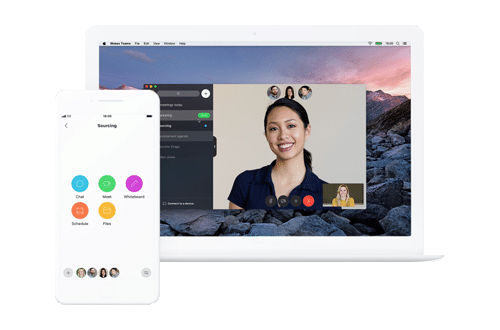
Put simply, collaboration applications are capabilities such as video conferencing, instant messaging, and file sharing that you can offer to your employees for them to use to make their job easier and streamline their everyday tasks.
The good news is that this does not have to be a decision you make in isolation. Well-designed systems should leave room for later collaboration additions as the requirements of your business evolve.
Do installation times vary from vendor to vendor?
In short, yes. Deployment time depends on the platform, devices, numbers, SIP or PSTN route, site readiness and support model. Make sure the plan explains what has to be configured, tested and handed over before users move.
A final note...
There are several factors to consider when changing a business phone system: users, devices, call quality, number routing, SIP or PSTN access, collaboration tools and support ownership.
The current Tesrex route is a UCaaS review that separates call control, the user surface, devices, rooms, SIP/PSTN and support ownership before change begins.